

Exhibition Hall SketchUp Model. Discover a premium exhibition hall SketchUp model for your next design project. This detailed 3D model offers realistic visuals for architectural presentations and virtual tours.
Transform Your Designs with a Premium Exhibition Hall SketchUp Model
In the dynamic world of architectural visualization and interior design, having access to high-quality 3D models is paramount. Posterfree.net is proud to present an exceptional exhibition hall SketchUp model, designed to elevate your projects and provide a realistic foundation for your creative visions. This comprehensive model is perfect for architects, interior designers, event planners, and students looking to create stunning visual presentations.
Unveiling the Details of Our Exhibition Hall SketchUp Model
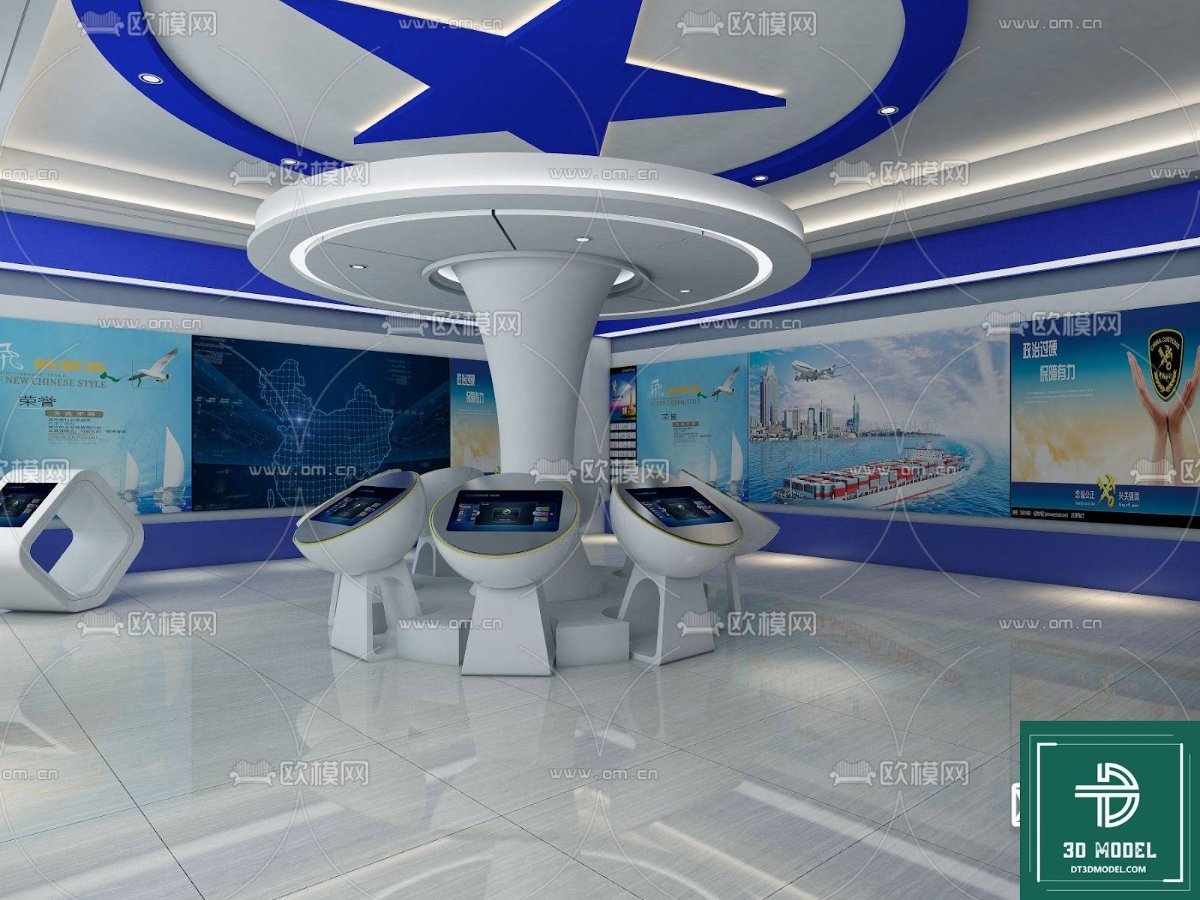
Our featured exhibition hall SketchUp model (phong trien lam SketchUp (97)) is a meticulously crafted asset that captures the essence of a modern, interactive exhibition space. The model showcases a sleek, contemporary design with a striking central information desk, surrounded by multiple interactive kiosks. The ceiling features a captivating blue star motif, adding a touch of futuristic elegance. The walls are adorned with various display panels, suggesting a versatile space capable of hosting diverse exhibits, from technological advancements to cultural showcases.
The design emphasizes open space and clear pathways, crucial for visitor flow in any exhibition setting. The reflective floor adds to the spacious feel, enhancing the overall aesthetic and providing a sense of grandeur. This model is not just a static representation; it’s a blueprint for functionality and aesthetic appeal, ready to be customized to your specific project needs.
Why Choose a SketchUp Model for Your Exhibition Hall Design?
SketchUp is renowned for its user-friendly interface and robust capabilities, making it a favorite among designers. Utilizing a pre-built exhibition hall SketchUp model offers numerous advantages:
- Time-Saving: Instead of building from scratch, you can jumpstart your design process, saving countless hours.
- Realistic Visualization: Present your concepts with high fidelity, allowing clients and stakeholders to fully grasp the spatial dynamics and aesthetic appeal.
- Flexibility and Customization: Easily modify elements, change textures, adjust lighting, and insert your specific exhibit content to tailor the space.
- Cost-Effective: Accessing a premium model from Posterfree.net provides professional-grade resources without the hefty price tag of custom modeling.
- Error Reduction: Working with a pre-validated model minimizes design errors and ensures accurate spatial planning.
Format and Resolution: Precision at Your Fingertips
This exhibition hall SketchUp model is provided in the native SketchUp (.skp) format, ensuring seamless integration into your existing SketchUp workflow. The resolution and detail are optimized for both close-up renders and broader architectural overviews, allowing for crisp, clear visuals in all your presentations. Whether you’re creating high-resolution images, walkthrough animations, or interactive virtual tours, this model delivers the quality you need.
Usage Instructions: Maximizing Your Design Potential
Integrating this model into your project is straightforward:
- Download: Obtain the .skp file from Posterfree.net.
- Import: Open the file directly in SketchUp or import it into an existing scene.
- Customize: Utilize SketchUp’s tools to modify materials, colors, and add your specific exhibit elements. You can easily replace the display panel graphics with your own content.
- Render: Use your preferred rendering engine (V-Ray, Enscape, Lumion, etc.) to generate photorealistic images or animations.
Consider using the various components within the model, such as the central desk and kiosks, as modular elements for other projects. The versatile design allows for adaptation to different types of exhibition or information centers.
Posterfree.net: Your Premier Source for Design Assets
At Posterfree.net, we are committed to providing designers with a vast collection of high-quality, professional-grade graphic resources. Our reputation for excellence is built on offering meticulously crafted assets that meet the rigorous demands of the creative industry. This exhibition hall SketchUp model is just one example of our dedication to supporting your design journey, offering both aesthetic appeal and practical utility.
We understand the importance of reliable resources, and our library is continuously updated with new and relevant content. When you choose Posterfree.net, you’re not just downloading a file; you’re investing in a valuable tool that enhances your productivity and elevates the quality of your output. Explore our extensive collection today and discover why countless professionals trust Posterfree.net for their design needs.
Beyond the Model: Enhancing Your Exhibition Design
While this SketchUp model provides an excellent foundation, consider these additional tips to further enhance your exhibition hall design:
- Lighting Design: Experiment with different lighting schemes to highlight specific exhibits and create various moods.
- Materiality: Play with textures and finishes to add depth and sophistication to the space.
- Wayfinding: Integrate clear signage and directional elements within your design for optimal visitor experience.
- Interactive Elements: Plan for interactive displays, touchscreens, and multimedia installations to engage your audience.
- Accessibility: Ensure your design is inclusive and accessible to all visitors, incorporating ramps, clear pathways, and accessible information points.
By combining the robust features of this exhibition hall SketchUp model with thoughtful design principles, you can create truly memorable and impactful exhibition spaces.
Related Demo Images


Frequently Asked Questions
What software is required to use this exhibition hall model?
This model is provided in the native SketchUp (.skp) format, so you will need SketchUp software (Pro or Make) to open and edit it.
Can I modify the textures and colors in the model?
Yes, the SketchUp model is fully editable. You can easily change textures, colors, and materials using SketchUp’s built-in tools or by importing new materials.
Is this model suitable for commercial projects?
Yes, resources from Posterfree.net are generally suitable for both personal and commercial projects, subject to our licensing terms. Please refer to the specific license for this asset on our website.
What is the resolution of the model?
The model is optimized for high-quality rendering and visualization, providing sufficient detail for both close-up views and overall architectural presentations.





























