

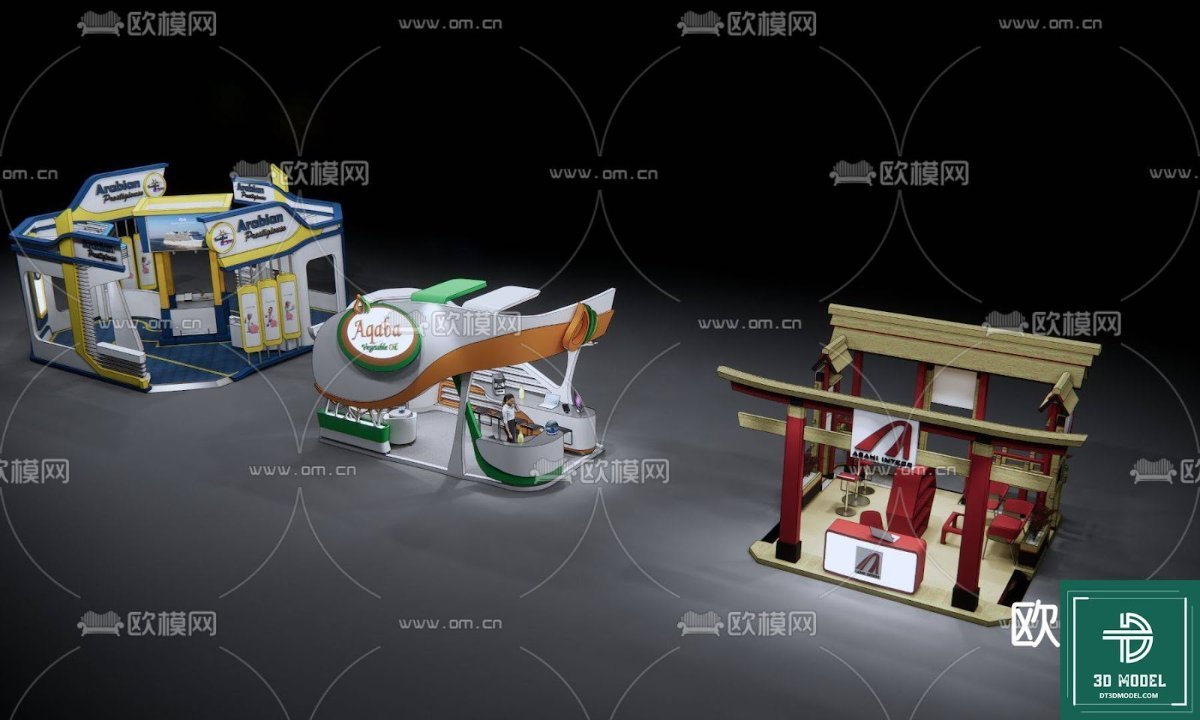
Exhibition Booth SketchUp Models. Discover premium exhibition booth SketchUp models at Posterfree.net, perfect for designers seeking high-quality 3D assets for event planning and visualization.
Elevate Your Event Designs with Premium Exhibition Booth SketchUp Models
In the dynamic world of event planning and exhibition design, creating an impactful and visually stunning booth is paramount. Whether you’re a seasoned architect, an exhibition designer, or a marketing professional, having access to high-quality 3D models can significantly streamline your workflow and enhance your presentations. At Posterfree.net, we understand this critical need, which is why we offer an exclusive collection of exhibition booth SketchUp models designed to bring your visions to life with unparalleled detail and realism.
The Power of 3D Visualization in Exhibition Design
Before a single panel is cut or a structure is erected, the ability to visualize your exhibition booth in three dimensions is invaluable. SketchUp, with its intuitive interface and robust capabilities, has become a go-to tool for designers worldwide. Our collection of exhibition booth SketchUp models provides a solid foundation for your projects, allowing you to:
- Experiment with Layouts: Easily test different booth configurations, traffic flows, and product placements.
- Visualize Aesthetics: See how colors, textures, and lighting interact within the space.
- Communicate Effectively: Present clear, compelling visuals to clients and stakeholders, ensuring everyone is on the same page.
- Identify Potential Issues: Spot design flaws or logistical challenges before they become costly problems during construction.
Posterfree.net is committed to providing resources that empower designers, and our 3D models are a testament to this commitment. We ensure that each model is crafted with precision, offering both aesthetic appeal and practical utility.
Unveiling Our Collection: What Makes Posterfree.net Stand Out?
Our ‘phong trien lam SketchUp (17)’ resource is a prime example of the quality and versatility you can expect from Posterfree.net. This particular asset features a diverse range of exhibition booth designs, catering to various themes and requirements. From modern, minimalist structures to more elaborate, culturally inspired setups, these models are ready to be integrated into your SketchUp projects.
Detailed Analysis of the ‘phong trien lam SketchUp (17)’ Resource
The image provided showcases three distinct exhibition booth designs, each offering unique architectural and thematic elements:
- Modern Retail Kiosk: This model features a vibrant, multi-level design with clear branding opportunities and display areas. Its open structure suggests accessibility and engagement, ideal for product showcases or interactive experiences. The use of bright colors and dynamic shapes makes it visually appealing and attention-grabbing.
- Futuristic Information Hub: With its sleek, curved lines and integrated signage, this booth exudes a contemporary and high-tech feel. It appears designed for efficient information dissemination or technology demonstrations, offering a clean and organized aesthetic. The elevated platform adds a sense of importance and distinctiveness.
- Traditional Japanese-Inspired Pavilion: This design beautifully incorporates elements of traditional Japanese architecture, such as a torii gate and wooden structures. It evokes a sense of cultural richness and tranquility, perfect for events with an international or heritage theme. The open-air concept suggests a welcoming and contemplative space.
Each of these models is meticulously detailed, providing a solid foundation for customization. Designers can easily modify materials, add specific branding elements, incorporate furniture, and adjust lighting to match their exact project requirements. The versatility of these exhibition booth SketchUp models means they can be adapted for trade shows, corporate events, cultural festivals, and more.
Optimized for Performance and Ease of Use
At Posterfree.net, we prioritize not only the aesthetic quality but also the practical usability of our resources. Our SketchUp models are optimized for performance, ensuring they integrate smoothly into your existing projects without causing unnecessary lag or rendering issues. They are designed to be user-friendly, allowing both beginners and experienced SketchUp users to quickly incorporate them into their designs.
Usage Instructions and Best Practices:
- Importing the Model: Simply download the SketchUp file and import it directly into your SketchUp project.
- Customization: Utilize SketchUp’s powerful tools to modify colors, textures, and components. You can easily add your client’s branding, product displays, and interactive elements.
- Lighting and Rendering: Experiment with different lighting setups to highlight key areas of the booth. For photorealistic results, consider using rendering plugins compatible with SketchUp.
- Scale and Proportion: Ensure the models are scaled correctly within your overall exhibition hall design to maintain realistic proportions.
Why Choose Posterfree.net for Your 3D Model Needs?
Posterfree.net has established itself as a premium destination for graphic resources, and our 3D models are no exception. We are dedicated to providing designers with assets that are not only visually appealing but also technically sound and highly functional. When you choose our exhibition booth SketchUp models, you benefit from:
- High-Quality Assets: Every model is crafted with attention to detail and accuracy.
- Versatility: Our diverse collection caters to a wide range of design styles and project requirements.
- Time-Saving Solutions: Ready-to-use models significantly reduce design time, allowing you to focus on creativity.
- Reliable Resource: Posterfree.net is a trusted name in the graphic design community, known for its commitment to quality and user satisfaction.
Conclusion: Your Partner in Exhibition Design Excellence
In the competitive landscape of event and exhibition design, having the right tools can make all the difference. The exhibition booth SketchUp models available at Posterfree.net, including the versatile ‘phong trien lam SketchUp (17)’ resource, offer an unparalleled advantage. They provide the foundation for creating stunning, functional, and memorable exhibition spaces that captivate audiences and achieve your event objectives. Explore our collection today and transform your design process with premium 3D assets from Posterfree.net.
Hình ảnh demo liên quan
Câu hỏi thường gặp
What software is required to use these exhibition booth models?
These models are specifically designed for SketchUp. You will need SketchUp Pro or SketchUp Free (web version) to open and edit them.
Are the models customizable?
Yes, all our exhibition booth SketchUp models are fully customizable. You can easily change colors, textures, materials, add branding, and modify components to fit your specific design needs.
What kind of events are these models suitable for?
Our diverse collection of exhibition booth SketchUp models is suitable for a wide range of events, including trade shows, corporate events, product launches, cultural festivals, art exhibitions, and more.
Do these models include interior elements or just the structure?
The models primarily focus on the booth structure and exterior elements. While some may include basic interior layouts, they are designed to be a foundation for you to add your specific furniture, displays, and interactive elements.
How can I ensure the models render realistically?
For photorealistic rendering, you can utilize SketchUp’s native rendering capabilities or integrate third-party rendering plugins like V-Ray, Enscape, or Lumion, which are compatible with SketchUp models.





























