


Exhibition Booth SketchUp Model. Discover a premium exhibition booth SketchUp model, perfect for designers and businesses planning their next event. Get high-quality 3D assets for stunning presentations.
Design Your Perfect Event with an Exhibition Booth SketchUp Model
In the competitive world of trade shows and exhibitions, making a lasting impression is paramount. A well-designed booth can be the difference between blending in and standing out. For designers, marketers, and businesses looking to visualize and plan their event spaces with precision, an exhibition booth SketchUp model is an indispensable tool. Posterfree.net is proud to offer a premium selection of 3D models, including this versatile exhibition booth, designed to elevate your planning process.
Why Choose a SketchUp Model for Your Exhibition Booth?
SketchUp is renowned for its user-friendly interface and powerful 3D modeling capabilities, making it a favorite among architects, interior designers, and event planners. Utilizing an exhibition booth SketchUp model provides numerous advantages:
- Realistic Visualization: See your booth come to life in 3D before a single panel is constructed. This allows for critical adjustments and refinements.
- Efficient Planning: Plan layouts, traffic flow, and product placement with ease, ensuring optimal use of space.
- Cost Savings: Identify potential design flaws or material requirements early, avoiding costly changes during construction.
- Enhanced Collaboration: Share your 3D model with clients, contractors, and team members for clear communication and feedback.
- Marketing & Presentation: Use high-quality renders from the model for marketing materials, investor presentations, and pre-event promotions.
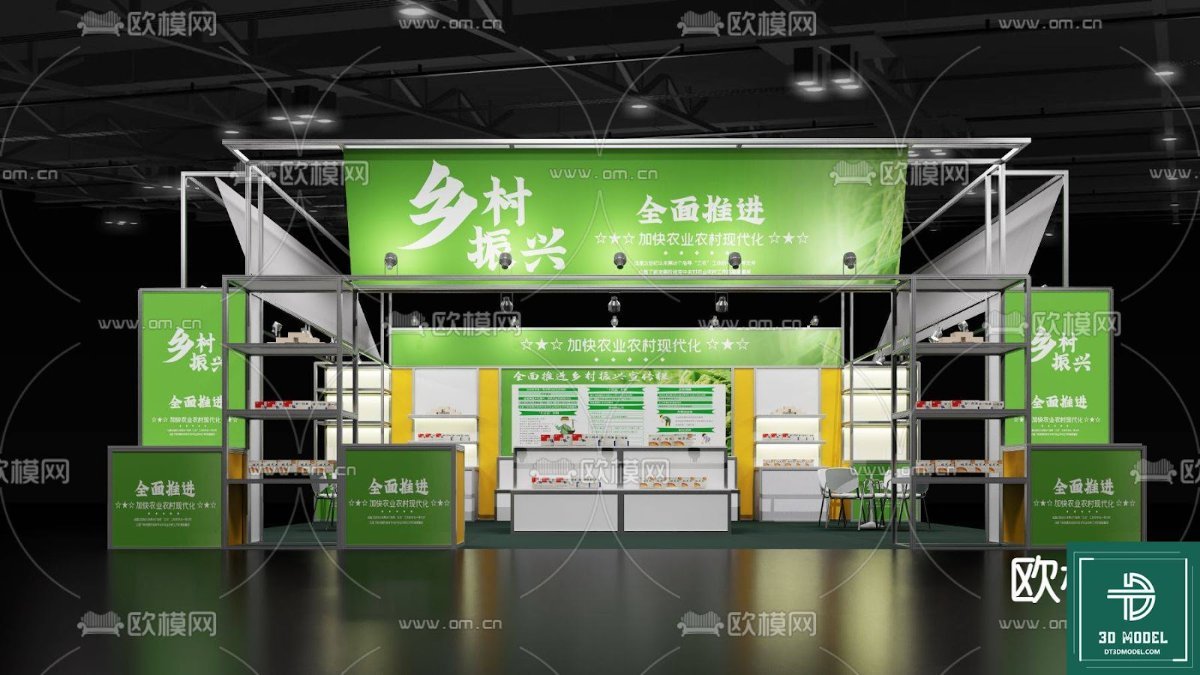
Our featured exhibition booth SketchUp model is meticulously crafted to offer a realistic and functional base for your design needs. It provides a modern, spacious layout with areas for product display, interactive screens, and a welcoming reception desk, as seen in the accompanying image. The design incorporates sleek lines and strategic lighting, creating an inviting and professional atmosphere.
Detailed Analysis of the Exhibition Booth SketchUp Model
This particular exhibition booth SketchUp model, known as “phong trien lam SketchUp (161)”, showcases a contemporary design ideal for a wide range of industries. Let’s delve into its key features:
Format and Resolution
This model is provided in a SketchUp-compatible format, ensuring seamless integration into your existing design workflow. SketchUp models are known for their flexibility, allowing for high-resolution renders and detailed walkthroughs. The geometry is clean and optimized, meaning it will perform efficiently even in complex scenes, while still providing enough detail for close-up shots and realistic visualizations. The textures applied are of high quality, contributing to the overall professional appearance of the booth.
Key Design Elements and Usage Instructions
The model features several distinct areas:
- Reception Area: A prominent, illuminated reception desk serves as the focal point, perfect for greeting visitors and providing information. You can easily customize the branding and logo on the desk.
- Display Zones: Multiple wall-mounted screens and display panels are integrated, offering ample space for showcasing products, services, or interactive content. These can be customized with your specific graphics and videos.
- Seating/Consultation Area: A small, informal seating area with a table and chairs provides a comfortable space for discussions with potential clients.
- Architectural Details: The booth features a striking orange and grey color scheme, with illuminated accents that draw attention. The open ceiling design adds to the spacious feel.
Usage Instructions:
- Import: Simply import the SketchUp file into your SketchUp software.
- Customization: Utilize SketchUp’s tools to modify colors, textures, and materials to match your brand guidelines. Replace placeholder logos and screen content with your own.
- Layout Adjustment: Easily rearrange internal elements like furniture or display units to suit your specific needs.
- Lighting & Rendering: Experiment with different lighting setups and use rendering plugins (like V-Ray or Enscape) to create stunning, photorealistic images and animations of your customized booth.
- Export: Export your final design in various formats for presentations, manufacturing, or marketing materials.
The Posterfree.net Advantage
At Posterfree.net, we are committed to providing premium graphic resources that empower designers and businesses. Our extensive library includes a wide array of high-quality 3D models, vectors, templates, and more, all curated to meet professional standards. This exhibition booth SketchUp model is a testament to our dedication to quality and utility. By choosing Posterfree.net, you gain access to:
- Professional Quality: Every asset is crafted with attention to detail and industry best practices.
- Time-Saving Solutions: Ready-to-use models save you valuable design time, allowing you to focus on creativity.
- Versatile Resources: Our assets are designed to be easily customizable and adaptable to various projects.
- Reliable Support: We stand by the quality of our products and are here to assist you.
Invest in your next event’s success by leveraging the power of a professional exhibition booth SketchUp model from Posterfree.net. Start visualizing your perfect presence today and make an unforgettable impact.
Frequently Asked Questions about Exhibition Booth SketchUp Models
Related Demo Images



Frequently Asked Questions
What software is required to use this exhibition booth SketchUp model?
This model is designed for use with SketchUp software (SketchUp Pro or SketchUp Free/Web version). You may also use compatible rendering software like V-Ray or Enscape for photorealistic outputs.
Can I customize the branding and colors of the booth?
Absolutely! The SketchUp model is fully editable, allowing you to easily change colors, apply your own textures, and replace placeholder logos with your company’s branding.
Is this model suitable for commercial use?
Yes, resources from Posterfree.net, including this exhibition booth SketchUp model, are generally suitable for commercial projects. Please refer to our licensing terms for specific details on usage rights.
What level of detail can I expect from this 3D model?
This model is crafted with a high level of detail suitable for professional presentations and visualizations. It includes realistic textures, lighting elements, and structural components to give you an accurate representation of your future booth.





























