Cherry Blossom Mask Vector. Discover the exquisite cherry blossom mask vector from Posterfree.net, perfect for intricate design projects. Enhance your graphics with this beautiful and versatile asset.
Unveiling the Beauty: Cherry Blossom Mask Vector for Your Designs
In the world of graphic design, the right asset can transform a good project into an extraordinary one. Today, we delve into a truly captivating resource: the cherry blossom mask vector, specifically the AM86_025_mask_01 available exclusively on Posterfree.net. This versatile graphic is not just an image; it’s a gateway to creating stunning, intricate designs with ease and precision. Whether you’re a seasoned professional or an aspiring designer, understanding the potential of this asset will elevate your creative endeavors.
What is a Cherry Blossom Mask Vector?
A cherry blossom mask vector is a digital graphic representation of cherry blossoms, designed in a vector format. The ‘mask’ aspect implies its primary use in masking techniques, allowing designers to reveal or conceal parts of an image or design through the shape of the cherry blossom. Vector graphics, unlike raster images, are composed of paths, lines, and curves defined by mathematical equations. This fundamental difference means they can be scaled to any size without losing resolution or clarity. This makes the cherry blossom mask vector an indispensable tool for projects ranging from small icons to large-format prints.
Why Choose Posterfree.net for Your Graphic Resources?
Posterfree.net has established itself as a premier destination for high-quality graphic resources. Our commitment to providing designers with top-tier assets, like this exquisite cherry blossom mask vector, is unwavering. We understand the demands of modern design and strive to offer resources that are not only visually appealing but also technically robust and easy to integrate into various design workflows. When you choose Posterfree.net, you’re choosing reliability, quality, and a vast library of creative possibilities.
Analyzing the AM86_025_mask_01 Asset
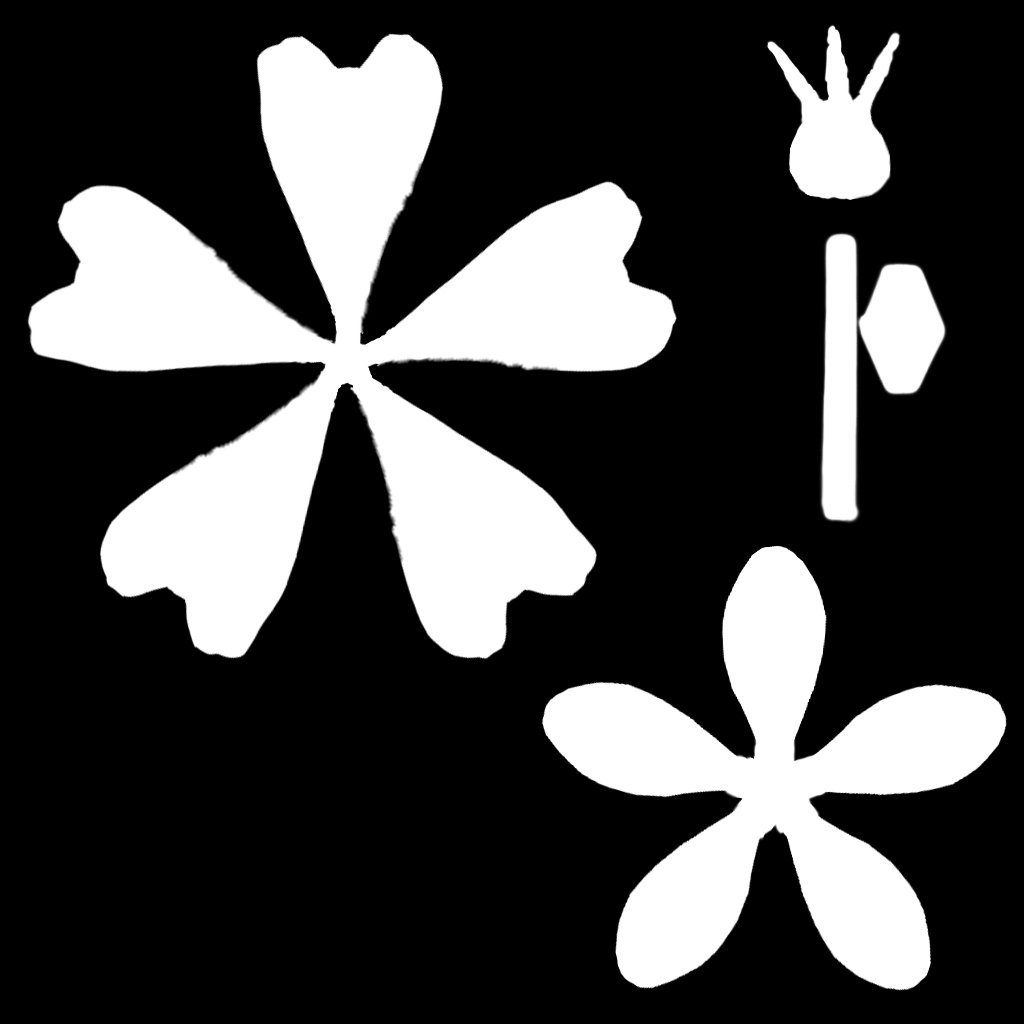
The AM86_025_mask_01 asset is a prime example of Posterfree.net’s dedication to quality. This particular cherry blossom mask vector features distinct elements that make it incredibly useful:
- Multiple Blossom Shapes: The asset includes at least two distinct cherry blossom shapes, offering variety for different design needs. One appears to be a five-petal blossom with slightly rounded petals, while the other is a more stylized, perhaps four-petal design. This variety allows for dynamic compositions.
- Individual Petal/Stamen Elements: Beyond the full blossoms, there are smaller, individual elements that resemble petals or stamen. These are crucial for adding fine details, creating custom blossom arrangements, or even designing abstract floral patterns.
- Clean, Crisp Edges: As a vector graphic, the edges of all elements are perfectly smooth and sharp, ensuring professional results even when scaled significantly. This is vital for print materials where clarity is paramount.
- Monochromatic Design: Presented in a stark black and white, this mask is inherently versatile. It can be easily recolored to match any brand palette or design theme, or used as a transparent overlay.
Optimal Resolution and Format
As a vector graphic, the AM86_025_mask_01 cherry blossom mask vector inherently offers infinite resolution. This means you can use it for:
- Web Graphics: From small icons and favicons to large hero images, the vector will remain crisp.
- Print Media: Ideal for brochures, flyers, posters, banners, and even billboards, without any pixelation.
- App Design: Perfect for UI elements and splash screens, ensuring scalability across various device resolutions.
The typical formats for such vector assets include AI (Adobe Illustrator), EPS (Encapsulated PostScript), and SVG (Scalable Vector Graphics). These formats ensure maximum compatibility with professional design software.
Creative Usage Instructions for Your Cherry Blossom Mask Vector
The applications for this cherry blossom mask vector are vast and varied. Here are some ideas to spark your creativity:
1. Photo Masking and Clipping Paths
The most direct use is as a mask. Place the cherry blossom vector over a photograph or texture, then use it as a clipping mask. This will reveal only the parts of the image that fall within the blossom’s shape, creating stunning visual effects. Imagine a beautiful landscape revealed through the delicate outline of a cherry blossom.
2. Background Patterns and Textures
Duplicate and arrange the blossoms to create seamless or randomized patterns for backgrounds. Vary the size, rotation, and opacity of individual elements to add depth and interest. This can be perfect for website backgrounds, social media graphics, or even packaging designs.
3. Branding and Logo Design
Incorporate the elegant shape of the cherry blossom into logos or brand identities, especially for businesses related to beauty, nature, wellness, or Japanese culture. The clean lines of a vector make it ideal for scalable branding elements.
4. Decorative Elements and Borders
Use the individual blossom shapes to create decorative borders, dividers, or embellishments for invitations, certificates, or editorial layouts. The smaller elements can be used to add subtle floral accents.
5. Text Effects
Combine the cherry blossom mask with text. You can use the blossom shape to mask a texture that fills the text, or place text within the negative space created by the blossom. This adds a unique, artistic touch to typography.
6. Stencils and Cut-outs
Given its vector nature, this asset is perfect for creating stencils for physical crafts, laser cutting designs, or even embroidery patterns. The precise outlines ensure clean cuts and accurate reproductions.
Integrating with Popular Design Software
Working with the cherry blossom mask vector is straightforward in most professional design applications:
- Adobe Illustrator: Open AI or EPS files directly. Use the Pathfinder panel for combining shapes, or the Clipping Mask feature for masking images.
- Adobe Photoshop: Import as a Smart Object to maintain vector scalability. Use it as a vector mask on layers for non-destructive editing.
- CorelDRAW: Similar to Illustrator, you can open and manipulate EPS or AI files, using its powerful vector tools.
- Inkscape: A free and open-source alternative that fully supports SVG files, allowing for complete vector manipulation.
Conclusion: Elevate Your Designs with Posterfree.net
The AM86_025_mask_01 cherry blossom mask vector from Posterfree.net is more than just a graphic; it’s a versatile tool that empowers designers to create breathtaking visuals. Its infinite scalability, clean lines, and inherent elegance make it suitable for a myriad of projects, from digital art to print media. By leveraging the quality resources available at Posterfree.net, you ensure that your designs not only stand out but also resonate with your audience. Explore this and many other premium assets today, and unlock new dimensions in your creative journey.
Related Demo Images
Frequently Asked Questions
What is a cherry blossom mask vector?
A cherry blossom mask vector is a scalable digital graphic of cherry blossoms used primarily for masking, patterns, and decorative elements in design, maintaining clarity at any size.
Can I use this vector for commercial projects?
Yes, resources from Posterfree.net, including this cherry blossom mask vector, are typically available for both personal and commercial use, subject to our licensing terms. Please check the specific license for AM86_025_mask_01.
What software do I need to use this vector?
You can use professional design software like Adobe Illustrator, Adobe Photoshop (as a Smart Object), CorelDRAW, or free alternatives like Inkscape, which support AI, EPS, or SVG formats.
Will the cherry blossom mask vector lose quality when scaled?
No, as a vector graphic, it is infinitely scalable without any loss of resolution or clarity, making it perfect for both small web graphics and large print materials.
How can I recolor the cherry blossom mask vector?
In vector editing software, you can easily select the elements and apply any color fill or stroke to match your design palette. Its monochromatic nature makes recoloring straightforward.